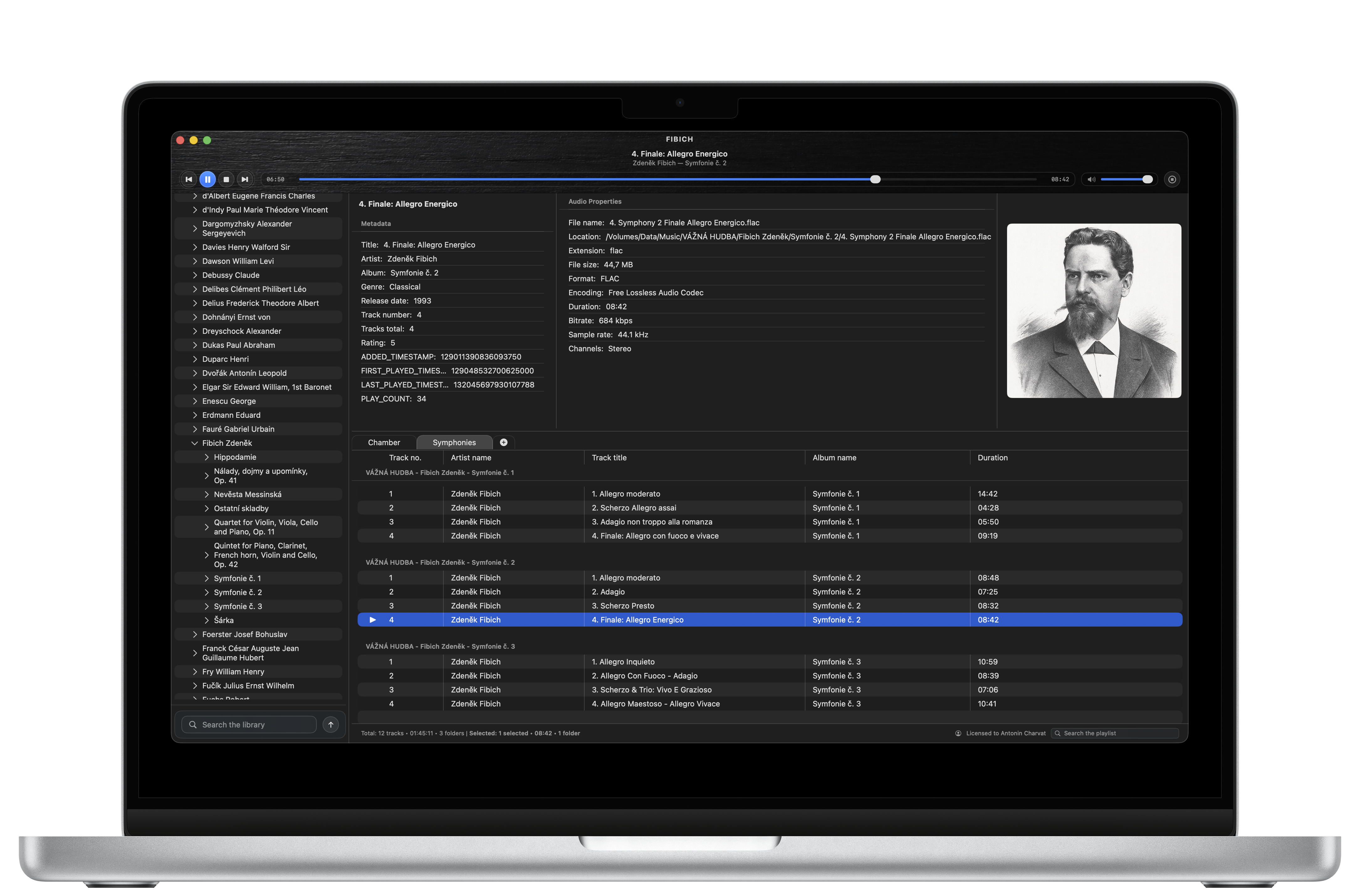
Today I’m happy to share something I’ve been working toward for a long time: Fibich is now available for macOS.
What started as a personal project has become a player you can bring into your own listening routine. Getting to this point has taken longer than I first imagined, with pauses for other projects and plenty of small problems that turned out to deserve serious attention. It feels good to finally open the door.
Fibich is built for people who keep their own music collections. Albums collected over the years, carefully named folders, lossless recordings, and playlists worth returning to. I wanted a native Mac app that could bring playback, library organization, and metadata editing together in one comfortable place.
The released player supports FLAC, ALAC, WAV, AIFF, MP3, Opus, Ogg, and many other audio formats. You can browse your local music library, search for a recording, and build multiple playlists that remain there when you close and reopen the app. Opening music directly from Finder fits into that same workflow.
Metadata tools let you correct tags and organize the information behind your collection. Album artwork, audio properties, and configurable playlist columns help make recordings easier to recognize and compare. Media keys, macOS Now Playing controls, and menu-bar playback controls keep the music within reach while you work elsewhere.
The final stretch has brought some particularly useful improvements to playback itself.
One challenge was getting the handoff between tracks right. An audio engine can finish decoding a file before the last samples have actually reached your speakers. That distinction matters when preparing the next track, updating the playback display, and handling transitions. Recently, I’ve been tightening that coordination so the player follows what is being heard more accurately.
CUE sheets needed similar care. Several tracks can share one underlying audio file, but each still needs its own position and boundaries. Seeking within a movement should make sense within that movement, and playback should respect where it ends.
There was also a subtle playlist problem: changing the playlist could leave an already prepared track waiting in the playback queue. Fixing that means the next track follows your current choices more reliably.
For listeners using an external DAC or another audio output, Fibich now also offers optional sample-rate matching. When the selected device supports the recording’s sample rate, the player can request that rate automatically. It is a useful addition for collections that mix standard and high-resolution audio, with the device’s capabilities determining what is possible.
Making Fibich available has also meant finishing the practical work around the player: installation, license delivery, offline activation, and built-in updates. Once activated, Fibich can verify its license locally, so listening does not depend on a continuous connection to a licensing server.
There is a personal reason behind the name, too. Zdeněk Fibich’s music means a great deal to me. Naming the player after him, and basing its icon on his likeness, is my small tribute to a composer whose work I love. Seeing that name on a finished app makes today especially meaningful.
Fibich is available for macOS 15 and later, with an introductory one-time price of USD 9.99 for a perpetual license covering one Mac at a time. Checkout confirms the final localized total.
You can buy Fibich here.
I’m looking forward to hearing what you play with it, how it fits your collection, and where it still needs attention. Thank you for following the development so far. Today, Fibich gets to become part of someone else’s listening routine.