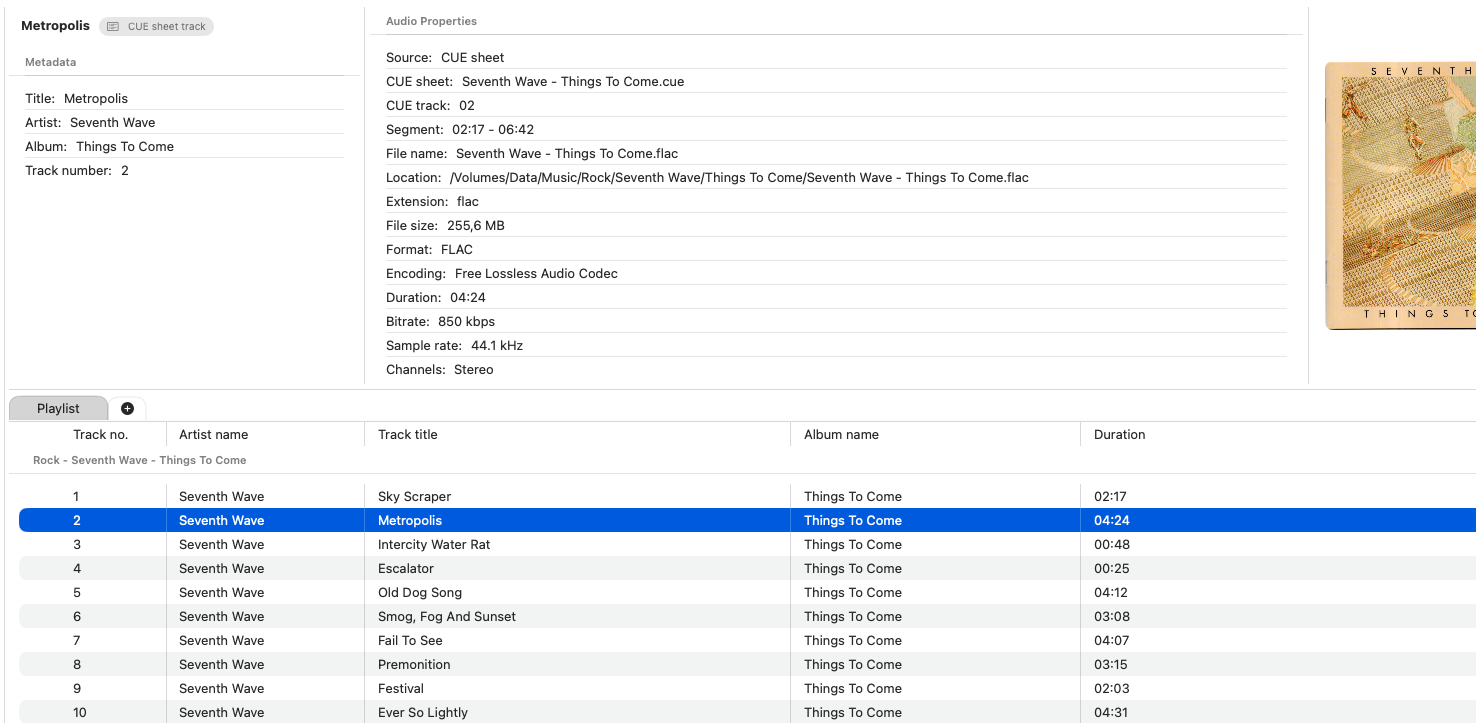
This week Fibich moved into the kind of work that only appears once a music player starts meeting real collections.
The main features are already present in some form: playback, playlists, metadata, library sync, search, artwork, settings, and macOS controls. But real local music libraries are full of less obvious situations. Albums arrive as folders. Tracks come from outside the main library. MP3 files have strange tags. Some albums are stored as one long audio file with a CUE sheet beside it.
This week was about those edges.
The playlist got better at ordering, sorting, and accepting external folder drops. Dropping a folder is different from dropping a few individual files. The app has to look inside, find playable audio, preserve a sensible order, and turn that into playlist content without making the user manually unpack the folder first.
External playlist tracks now persist across launches too. That is important because not every useful playlist item begins inside the main library. Sometimes a user drags in a folder from elsewhere, tests a few files, or builds a temporary listening list from music that has not been formally added to the library. If that playlist disappears after restarting the app, the experience feels fragile.
There was also work on album sorting. Playlist albums now sort by metadata album name rather than only the surrounding folder or file structure. This is a small detail, but it matters because music organization is rarely perfectly aligned. The folder name, file name, and embedded album tag may not all say the same thing. When the metadata is available, Fibich should use the musical meaning, not only the file-system accident.
A particularly annoying playback issue appeared with MP3 files that contain padded ID3 tags. These are the kinds of bugs that remind me why audio apps become complicated. The file looks like an MP3. It is an MP3. But the metadata layout can shift where playback should begin, and a player needs to account for that. This week includes a fix for that case, so padded ID3 tags should no longer break MP3 playback in the same way.
The biggest feature of the week is CUE sheet support.
CUE files matter a lot for certain hi-fi collections. Many albums, especially older rips or carefully archived releases, exist as one large audio file plus a .cue file describing the tracks inside it. Without CUE support, the player only sees one long file. With CUE support, Fibich can begin treating that file as an album with individual tracks.
That changes the listening experience.
A single-file FLAC album with a CUE sheet should not feel like one unhelpful hour-long blob. It should have track boundaries, titles, and playable sections. The user should be able to navigate the album as music, not as a raw file.
The code behind this needed a parser, changes to library track generation, updates to playback, metadata handling, audio properties, persistence, and the playlist table. CUE support reaches across the app because it blurs a normal assumption: one file does not always mean one track.
That is the central challenge. Fibich has to understand both physical files and musical tracks. Most of the time they are the same thing. With CUE sheets, they are not.
This week also adds a library action for sending an item to the current playlist from the context menu. You can browse the library, find something, and enqueue it without interrupting playback.
Taken together, the work addresses several real listening workflows: better folder drops, persistent external tracks, smarter album sorting, MP3 edge-case repair, CUE sheet playback, and faster queueing from the library.
This closes the current chapter of the development story.
Fibich started as an idea for a native macOS music player focused on local files. Now it is dealing with the details that make local files interesting: metadata, folders, playlists, moved tracks, unusual formats, external music, and album structures that do not fit the simplest model.
A hi-fi player should work even when the collection is untidy.