This week Fibich became easier to feed with music, and a little more at home on macOS.
The first part was drag and drop. Audio files can now be dragged directly into the app and added to the playlist flow. That feels obvious for a Mac music player, but it still needs careful wiring: Fibich has to receive file references from the system, decide whether they are supported, turn them into playable tracks, and add them without disturbing the current playlist state.
I also expanded the file types Fibich declares support for. This matters because the app is meant for real local hi-fi collections, not only the safest mainstream formats. A serious music library may contain FLAC, WAV, AIFF, ALAC, MP3, Ogg Vorbis, WavPack, tracker modules, and other less common audio files. The app needs to be open to that variety from the beginning.
There was also a small but useful playlist improvement: track duration is now visible. Duration sounds like a basic metadata field, but it changes how readable a playlist feels. Without it, the queue is just a list of names. With it, the user gets a better sense of the listening session: short tracks, long pieces, full albums, live recordings, and total flow.
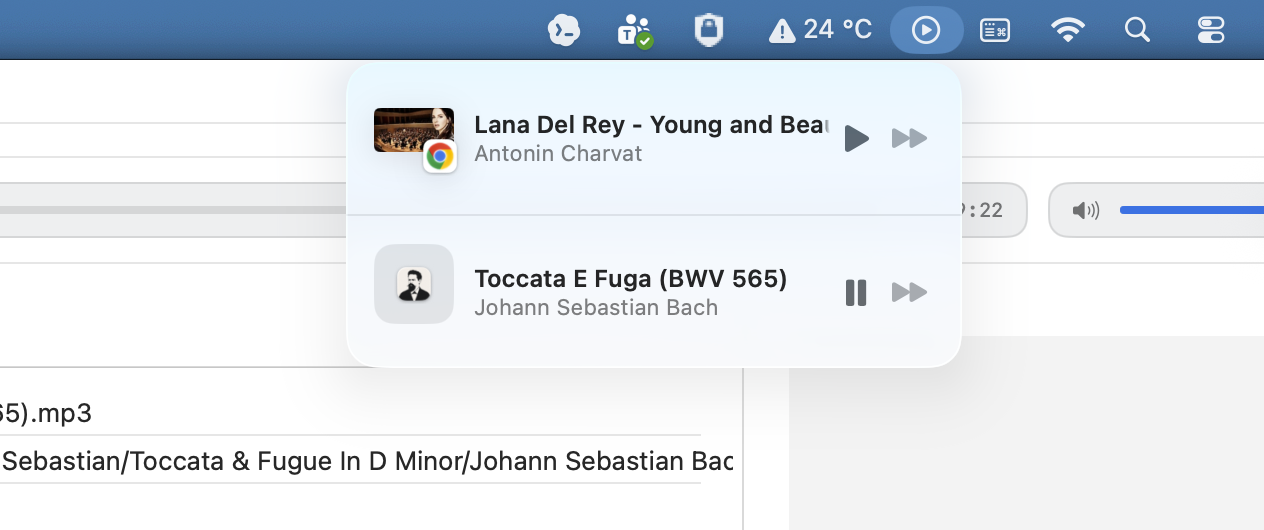
The more interesting macOS integration came today: command center and now playing information.
Fibich can now start talking to the system about what is playing. This means the app is no longer only updating its own window. It can expose current track information to macOS and respond to system-level playback controls. That is an important step toward feeling native.
The code behind this needed a clean place to live, so I added separate utilities for now playing information and command center handling. This keeps the player view model from becoming the place where every system integration detail gets dumped. The player still coordinates playback, but macOS-specific behavior now has a clearer boundary.
That separation matters because playback state is already busy. The app has to know what track is selected, what is playing, where the timeline is, what the playlist contains, and how user actions should affect all of it. Adding system media controls directly into that same pile would work for a moment, then become painful.
This week's work connects file input, playlist readability, and macOS playback integration.
You can drag music in. You can see more useful information in the playlist. And the system can begin to understand what Fibich is playing.
I want Fibich to be a native macOS hi-fi player that handles local files, supports many audio formats, and works with system playback controls.